Button
Options
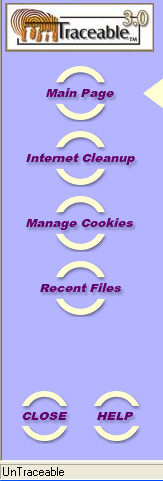 The button options are displayed on the
left side of the UnTraceable window. The options are “Main Page”, “Internet
Cleanup”, “Manage Cookies” and “Recent Files”. To select a button option,
move the mouse over the button and press the left button. Each of the
options displays a new work area to the right of the buttons when selected.
When an option is selected, an arrow is displayed to the right of it.
The button options are displayed on the
left side of the UnTraceable window. The options are “Main Page”, “Internet
Cleanup”, “Manage Cookies” and “Recent Files”. To select a button option,
move the mouse over the button and press the left button. Each of the
options displays a new work area to the right of the buttons when selected.
When an option is selected, an arrow is displayed to the right of it.
There are two button options located at the bottom left
of the window, these are “Close” and “Help”. Selecting the “Close” button
closes the main window, but does not close the UnTraceable application,
it is still working in the background. To exit out of UnTraceable completely,
right click on the UnTraceable icon in task bar and select the “Exit”
option. The “Help” button displays the help window for UnTraceable.