Select All: Selects all the cookies in the list to be save.
Unselect All: Removes the all the cookies from the saved list
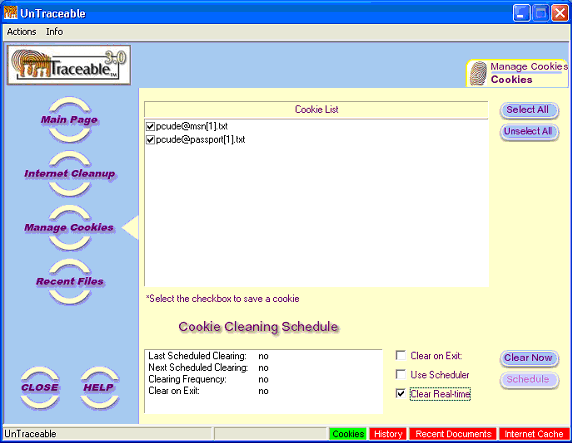
The Cookie Management form is shown when the Cookie Management button is selected. The form appears to the right of the button options. Cookies can be deleted or saved. To save a cookie, simple select the checkbox next to the cookie, then the next time cookies are cleared, the saved cookies will remain. The Cookie Management form displays the following items:
| Select All: Selects all the cookies in the list to be save. |
| Unselect All: Removes the all the cookies from the saved list |
Options are provide for clearing Cookies upon exit, by schedule or real-time. The options are at the bottom of the screen. The options are as follows:
| Clear on Exit: Clears the Unsaved Cookies on exit |
| Use Scheduler: Enables the Schedule button |
| Clear Real-time: Clears Cookies automatically. For example, Cookies created on the computer are automatically in Real-time without interaction from the user. |
| Clear Now: Clears the Unsaved Cookies now |
| Schedule: Displays the Schedule screen. The Schedule screen allows the user to schedule the ongoing clearing of Cookies at a selected times. |
| View: Displays the all the cookies, both saved and unsaved. |
Displayed below the Unsaved and Saved Cookie lists is the Schedule display. The Schedule display includes the Last Scheduled Clearing, Next Scheduled Clearing and Clearing Frequency (hour, day, week, etc.) . Schedules are created and managed by selecting the "Schedule" button. If the "Schedule" button is disabled, selecting the "Use Scheduler" checkbox will enable it.