Main Menu
The
Main menu is displayed near the top of the dialog screen. The two main
menu options are “Actions” and “Info”. To access the menu options, move
the mouse over the option and press the left mouse button.
Actions
Drop Down Menu: The “Actions” selection on the main menu displays submenus
for “Clear Items” and “Close".
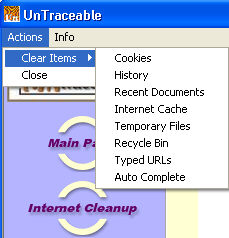 Clear
Items: Option to immediately clear Cookies, History, Recent Documents,
Internet Cache, Temporary File, Recycle Bin, Typed URL's and Auto Complete.
The clearing of other program information is done in the “Recent Files”
screen. The “Recent Files” screen is available by selecting the “Recent
Files” button option on the main window.
Clear
Items: Option to immediately clear Cookies, History, Recent Documents,
Internet Cache, Temporary File, Recycle Bin, Typed URL's and Auto Complete.
The clearing of other program information is done in the “Recent Files”
screen. The “Recent Files” screen is available by selecting the “Recent
Files” button option on the main window.
Close:
Closes the dialog screen. This does not exit the program. UnTraceable
can be accessed again by double clicking on the UnTraceable icon on the
taskbar.
Info Drop Down Menu: The “Info” selection
on the main menu displays the submenus for “Register UnTraceable”, “UnTraceable
License”, “About UnTraceable”.
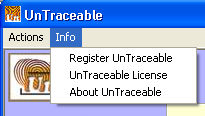 Register UnTraceable:
Displays the Register Dialog.
Register UnTraceable:
Displays the Register Dialog.
UnTraceable
License: Displays the UnTraceable license agreement.
About
UnTraceable: Provides product version and contact information for
UnTraceable.