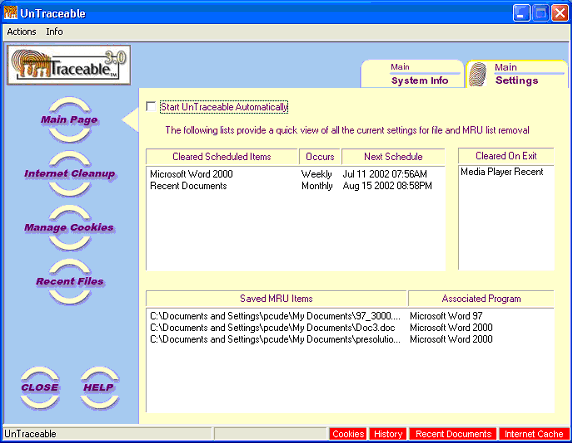
Main Settings
At the top of the Main
page are two tabs, one titled
Main - System Info and Main - Settings.
The selected page is identified by the fingerprint image on the pages
tab. You can return to the Main Settings form anytime by pressing the
“Main Page” option button on the left side of the main window and then
select the Main - Settings tab.
The purpose of the Main
Settings is to show all of the user configured selections at a glance.
This saves time locating a schedule or other settings without going through
each of the settings individually.
The
Main Settings form includes information specific to the current user and
includes the following items:
 | Start UnTraceable Automatically: Starts
UnTraceable automatically when Windows is started. |
| Cleared Scheduled Items List: A list of
items that has been scheduled for clearing. |
| Cleared
On Exit List: Items that will be cleared when UnTraceable is exited (or
Windows is shutdown) |
| Saved
MRU Items List: Items that have been saved and will not be removed. |