System Info


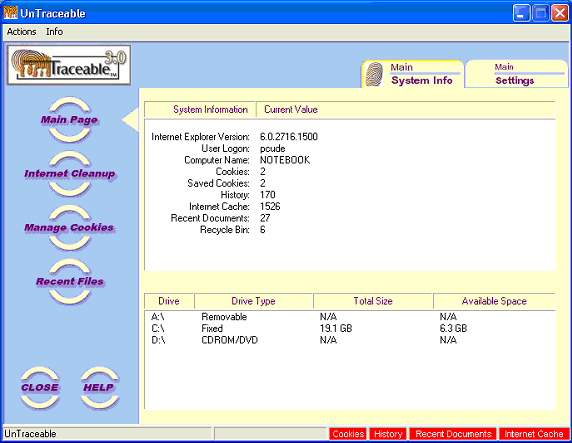
This is the default form on the Main Window. You can return to this the Main form anytime by pressing the “Main Page” button on the left side of the main window. At the top of the Main page are two tabs, one  titled Main - System Info and one titled Main -  Settings. The default tab is the Main - System Info. The selected page is identified by the fingerprint image on the pages tab. The default tab is the Main - System Info and it will be displayed when the "Main Page" button is selected.


The Main form includes information specific to the current user and includes the following items:


bullet

Internet Explorer version:  Displays the version of Internet Explorer installed on your system.

bullet

User log-on: If you log-on to your system, the user name use will be displayed.

bullet

Computer Name: The name of the computer UnTraceable is running on.

bullet

Cookies: The number of cookies.

bullet

Saved Cookies: The number of cookies the user has saved.

bullet

History: The number of history items.

bullet

Internet Cache: The number of Internet Cache items.

bullet

Recent Documents: The number of items in the users recent document list.

bullet

Recycle Bin: The number of items in the users recycle bin.

bullet

Temporary Files: The number of temporary files.

bullet

Drives: A list of the current disk drives.